
Take trade orders from a link, not a voice note
Trade customers order from their phone, and the cutting list, the invoice and the account balance follow from that one order. Built and deployed in 2026. One system — tailored to how your business works.
This is a B2B ordering app for wholesale food and butchers, and for any business that cuts, weighs or packs to order and sells on account to repeat trade customers. Customers open a link on their phone and type their own order, with nothing to install and no password. The office confirms orders on one board and prints the cutting list and pick sheets. Weights and prices are typed once, the invoice prints, and each customer's balance is worked out from the same order. Built and deployed in 2026 for a UK wholesale food business.
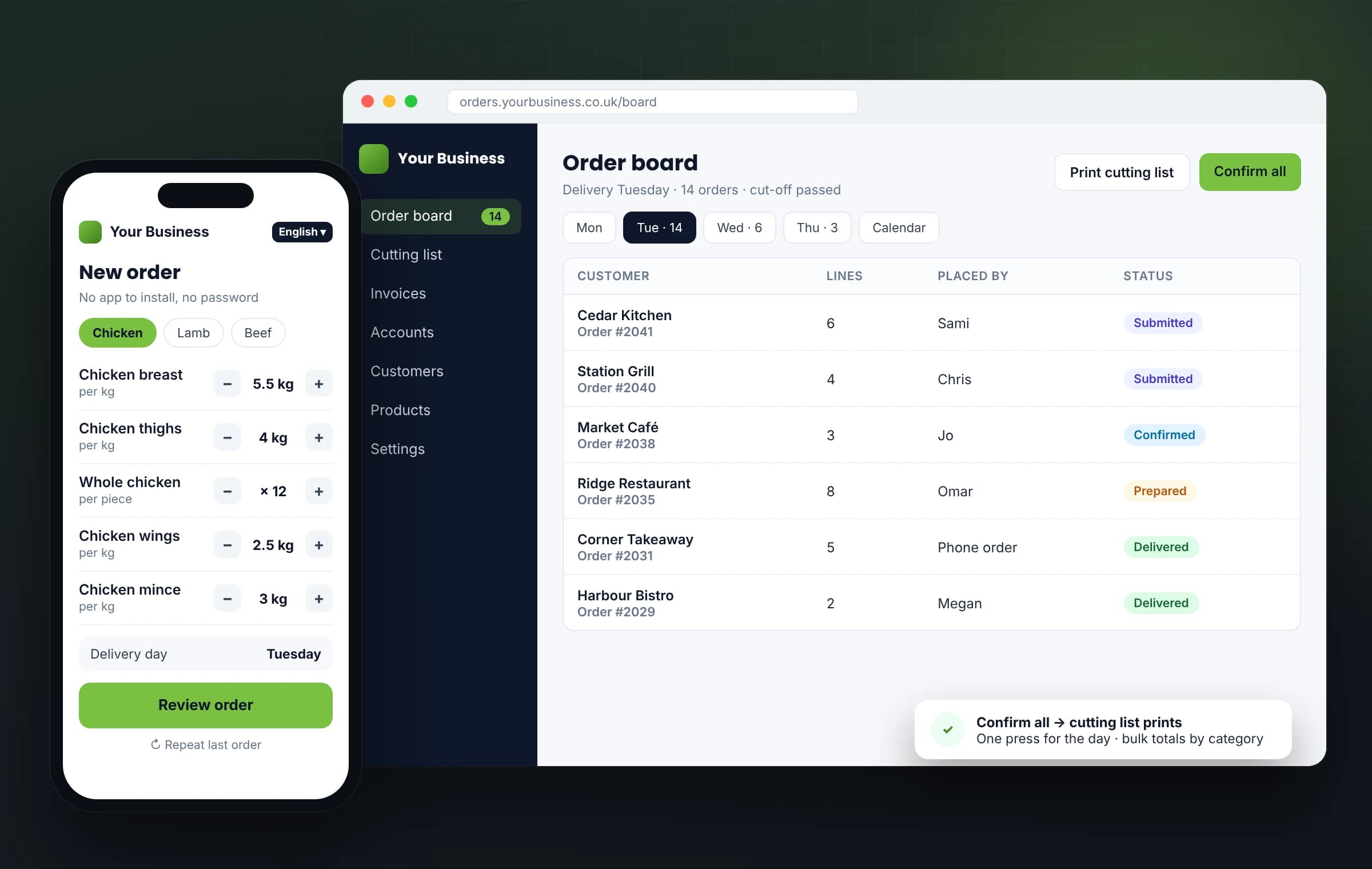
One platform, shaped around your business — not the other way round.
You're not buying rigid, off-the-shelf software. You get a proven system we tailor to how your trade actually works, then deploy and hand over.
Sound familiar?
The day-to-day this replaces
Before → now
What changes, line by line
Before
Late-night voice notes and texts, played back one by one.
Now
Customers type their own order on their phone and review it before sending.
Before
Every order copied by hand onto a paper sheet.
Now
Orders land on one board by delivery day, ready to confirm in one press.
Before
The cutting floor works from paper.
Now
The cutting list and pick sheets print from the orders, and the butcher ticks each line on screen.
Before
Weights and prices written by hand on the invoice, sums done by hand.
Now
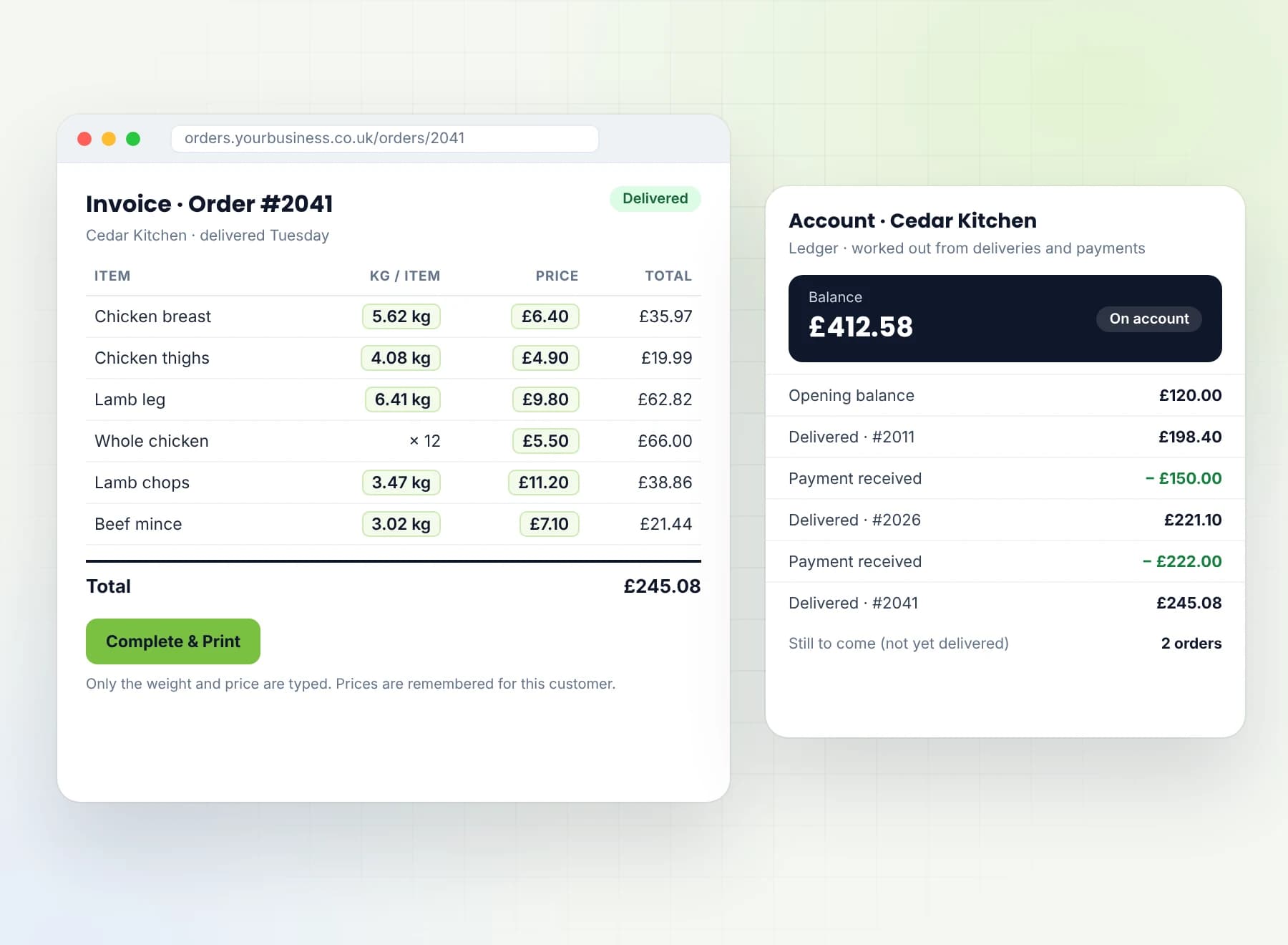
Only the weight and the price are typed; the invoice adds up and prints, laid out like your own paper invoice.
Before
No history of who ordered what.
Now
Every order is kept, with the name of the person who placed it.
A day with the system
One order, from phone to account
Customer
Late at night, opens the link, fills in the order sheet and picks a delivery day. On a personal link, they can repeat their last order.
Office
Early in the morning, opens the board for the day, presses Confirm all, and prints the cutting list and pick sheets.
Butcher
Works through the cutting list and ticks each line on the prepare panel. No prices on their screen.
Office
Types the actual weight and price for each line, then presses Complete & Print. The order is marked delivered and the invoice prints.
Office
At that moment, the delivery is added to the customer's account.
Office
When the customer pays, the payment is recorded against their account, and the balance updates.
One order, typed once by the customer, carries through to the invoice and the account.
Who uses it
One system, a view for each person
Trade customer
Orders from their phone, with nothing to install and no password. Reviews the order before sending, and picks the delivery day. Never sees prices.
Office
One order board by delivery day, with search, a month calendar and Confirm all. Edits any order, enters orders for customers who phone in, prints the cutting list and pick sheets, completes invoices, and keeps prices, customers, accounts and settings.
Cutting floor
Their own login and the prepare panel: each line to cut and pack, ticked off as it's done. Prices never appear.
New business
Applies from the link; the owner approves. Up to three contacts per business, and every order records who placed it.
Tailored
Built around your business
Your business isn't standard. Your software shouldn't be either. We set the system up to how you work: your catalogue and categories, your units and prices, your customers and their opening balances, your invoice layout and letterhead, your languages and your cut-off times. Need a field added, a step removed or a feature that doesn't exist yet? We change it or build it — before you go live, and as your business grows. We agree it with you first.
English as standard, and we add the languages your customers speak.
A look inside
One system, from first enquiry to final payment
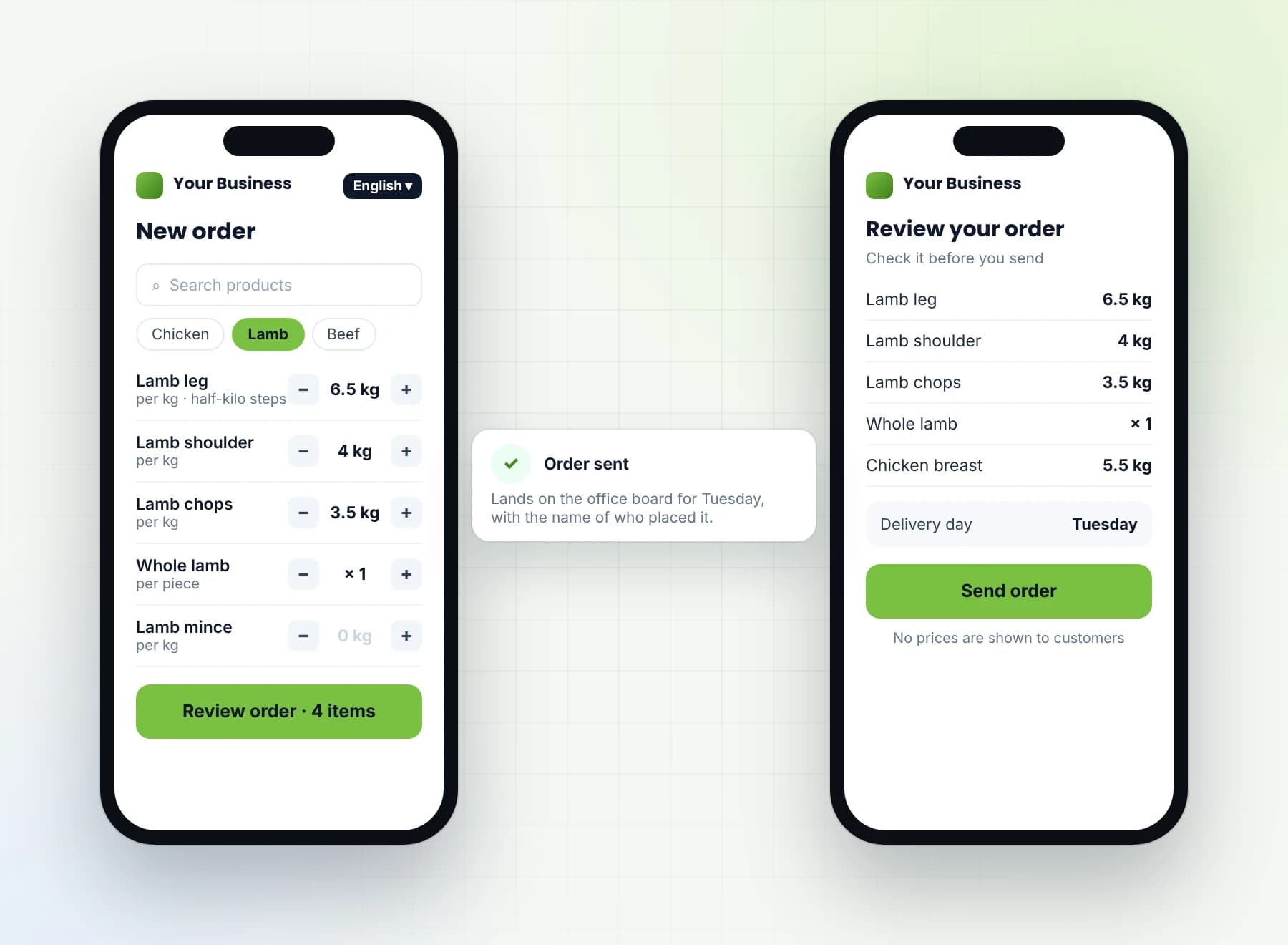
Orders typed by the customer
Customers open a link and order from their phone. Category pills and search find each product; weight goes in half-kilo steps and pieces in whole numbers. They review the order before sending.
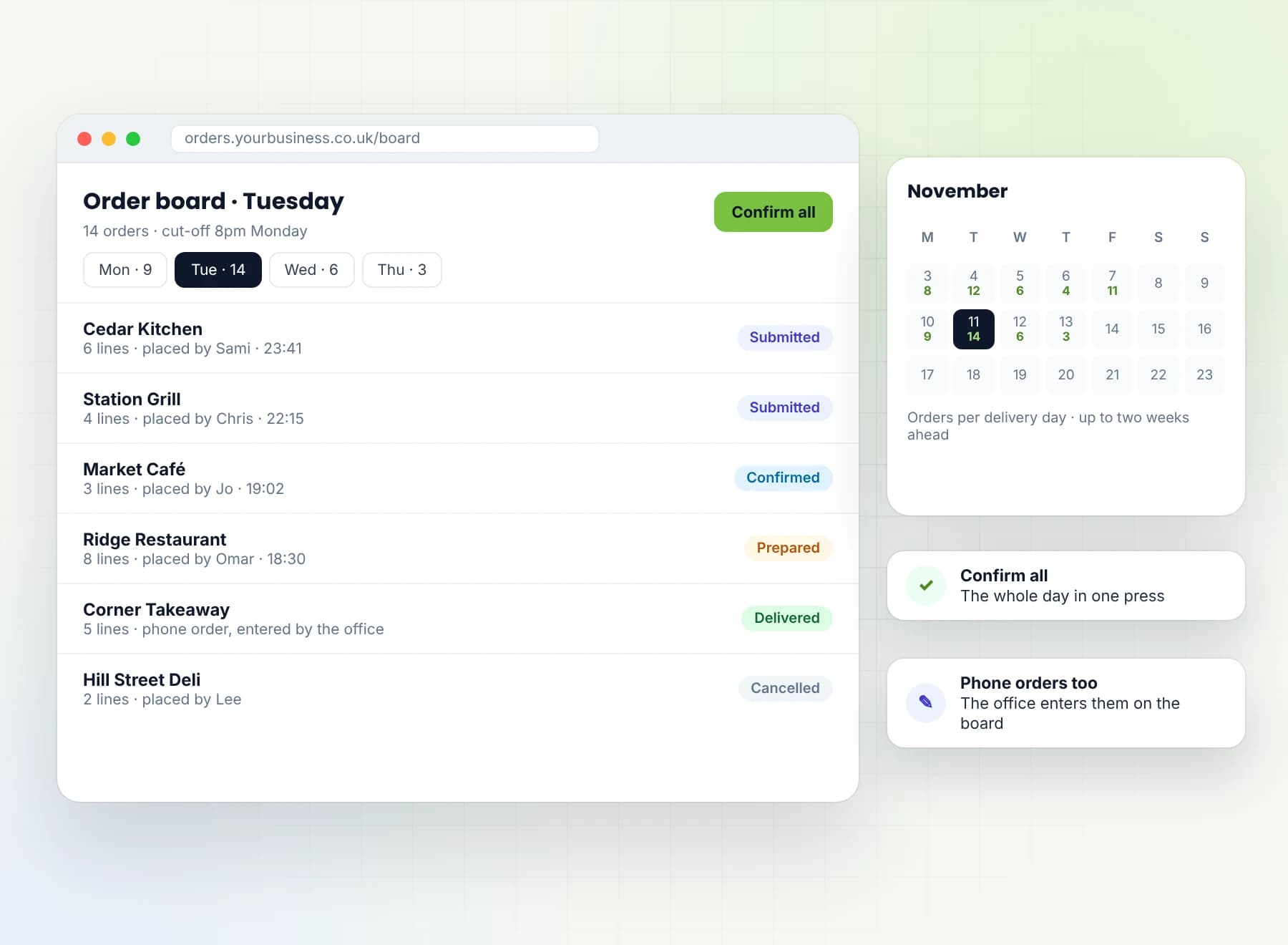
Order board by delivery day
Every order lands on one board for its delivery day, with search and a month calendar to look ahead. Confirm all confirms the day's orders in one press, and each order shows where it stands: submitted, confirmed, prepared, delivered or cancelled.
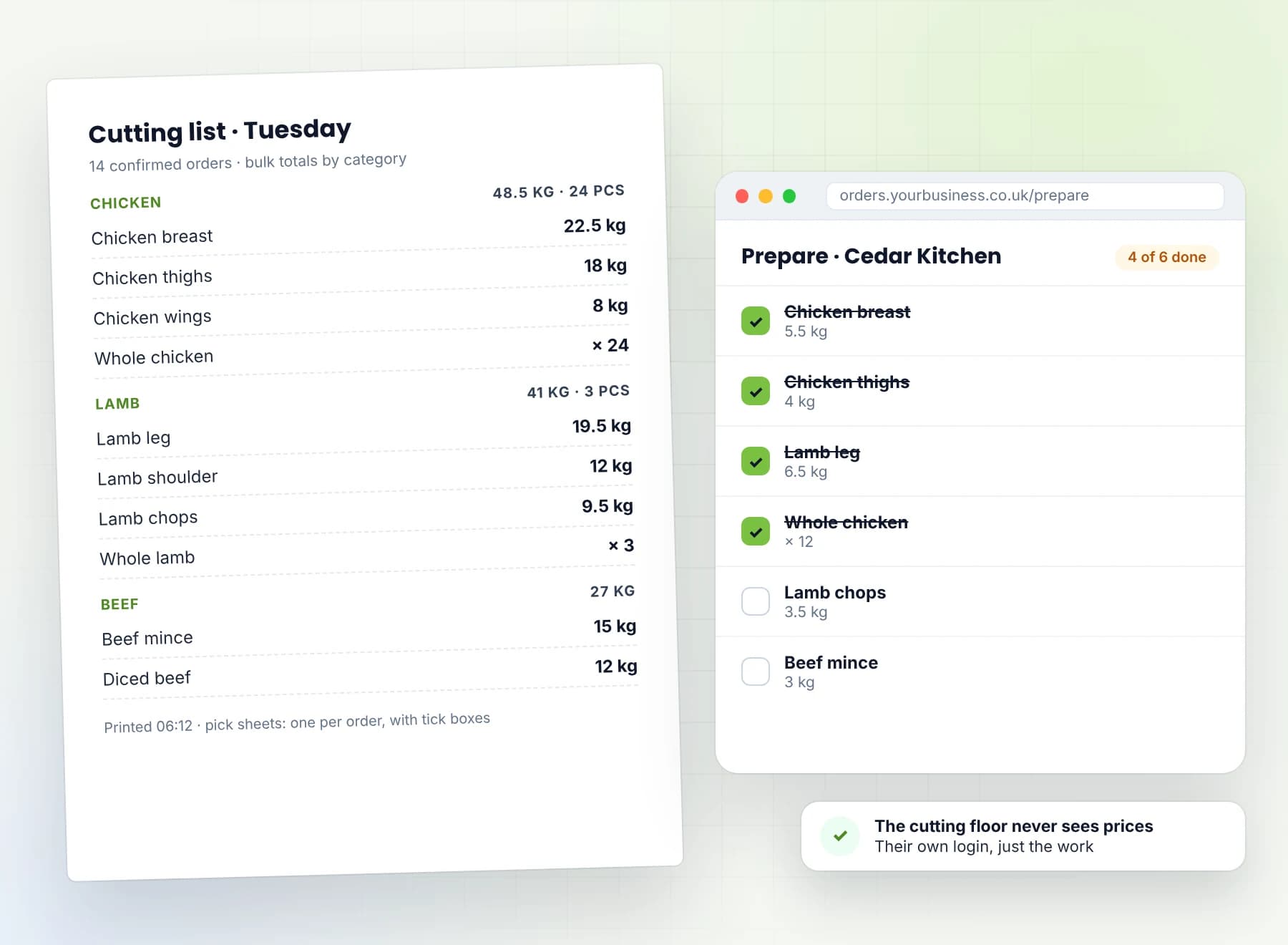
Cutting lists and pick sheets
From the confirmed orders, the office prints a cutting list with bulk totals by category, plus a pick sheet per order with tick boxes. The butcher ticks lines off on the prepare panel.
Invoices and customer accounts
Only the weight and the price are typed, and the invoice prints with a Kg/item column. Each customer has a ledger: opening balance, delivered, paid, balance and still to come.
How it works
A proven platform, tailored to you
We look at how you take orders
How orders arrive today, how they reach the cutting floor and the invoice, and where the time goes.
We set up your system
The system is already built and deployed. We set it up with your catalogue, your units, prices, customers, opening balances and cut-off times.
We take it live
Your customers get their ordering link, by WhatsApp if you like, and your office and cutting floor get their own logins. UK-hosted, with nightly off-site backups and a tested restore.
Run for you
Your data and your customers are yours, and we export them for you whenever you ask. The system is set up and run for you.
Built and tested
Proof, not a prototype
Built and deployed in 2026 for a UK wholesale food business. Ordering from a link, the order board, cutting lists, invoices and customer accounts are built and tested, with automated tests on the rules that keep the numbers right.
What's included
Everything in one platform
Ordering
- Opens from a link in the phone's browser: nothing to install, no password
- Works on inexpensive Android phones
- One shared link, with each customer known by their registered mobile number; unknown numbers arrive flagged as guest orders
- Optional personal links: order history, repeat last order, edit or cancel until the cut-off; a new link can be issued at any time
- Order sheet with category pills and search; half-kilo steps for weight, whole numbers for pieces
- Review before sending; the draft order is kept on the phone
- Delivery day chosen up to two weeks ahead
- No prices shown to customers
- New businesses apply from the link; the owner approves
- Up to three contacts per business; every order records who placed it
Your customers' languages
- English as standard
- We add the languages your customers speak
- Each customer's language saved, and switchable
- Product names kept in each language you use
Order board
- Orders by delivery date, with filter and search
- Statuses: submitted, confirmed, prepared, delivered, cancelled
- Confirm all in one press
- Month calendar view
- Edit any order, or enter one for a customer who phones in
- Cut-off time setting
- Separate logins for the office and the cutting floor
Cutting floor
- Cutting list with bulk totals by category
- Pick sheets with tick boxes, and a confirmed-orders sheet
- Prepare panel for the butcher, with no prices shown
Invoicing
- The invoice lives inside the order, laid out like your own paper invoice
- Only weight and price are typed, with a Kg/item column
- The printed copy hides unit prices
- Blank food-safety lines for temperatures and a signature
- Complete & Print marks the order delivered and prints the invoice
- Weekly totals sheet per customer
Prices
- Every typed price remembered as that customer's price, unless you choose not to
- The customer's own price first, then the list price
- Weight and pieces priced separately
- Each unit with its own price in the catalogue
Accounts
- A ledger per customer: opening balance, delivered, paid, balance and still to come
- Search by business name, with a page per customer
- Orders not yet delivered shown separately
- Opening balances, including credits
- Payments added, never edited; corrections by a reversing entry, shown in red
- Money not yet assigned to an order is reported
Built to last
- Prices frozen on each order line
- Prices unreachable from customer screens, and tested
- Balances worked out from deliveries and payments every time, never stored
- Cancelled orders count nowhere
- UK-hosted, with nightly off-site backups and a tested restore
- An automated test suite covering these guarantees
On the roadmap
- Invoices as PDF files (today they print)
- Printable account statements
- An installable phone app (today it opens in the browser)
- An edit history on every order
- Credit limits per customer
Built to last
The engineering behind it
UK-hosted, with nightly off-site backups and a tested restore. Two weeks of backups are kept on the server and a month off-site.
Prices that can't drift. Each price is frozen on the order line, and prices can't be reached from any customer screen. Both are covered by tests.
Money you can trace. Payments are added, never edited; a correction is a reversing entry, shown in red. Balances are worked out from deliveries and payments every time, not stored.
Tested automatically. An automated test suite checks these guarantees on every change.
Your data and your customers are yours, and we export them for you whenever you ask. The system is set up and run for you.
- Latest tech
- A modern web app that opens in any phone browser, with nothing to install.
- Speed
- Built for inexpensive Android phones, with the draft order kept on the phone until it's sent.
- Reliability
- UK-hosted, with nightly off-site backups and a tested restore.
- Security
- Separate logins for the office and the cutting floor, and prices that never reach customer screens.
- Performance
- One order, typed once, drives the cutting list, the invoice and the account.
Frequently Asked
Common questions, honest answers
What is the best ordering app for a wholesale food business?
Can customers order in their own language?
Do my customers need to download an app or remember a password?
Can customers see prices?
How are invoices produced, and can it keep each customer's prices?
Does it take payments?
How are customer accounts and balances kept?
Whose data is it?
Is it hosted in the UK?
Can you change it to fit my business, and how long does set-up take?
Why Sunrise
Why order from Sunrise
Built and deployed, not a mock-up. Ordering, cutting lists, invoices and accounts are built and tested.
Made for trade ordering. Weights and pieces, cutting lists, each customer's prices and accounts, set up for how you work.
Your data and your customers are yours, and we export them for you whenever you ask. The system is set up and run for you.
A timeline agreed before you start. No open-ended build.
Tell us how your customers order today, and we'll tell you plainly if this fits.
The quickest way is a message — tell us how you work now and we'll tell you plainly whether this is a fit. No pressure, no jargon.
Prefer a form? Three fields, that's it.