
A simple till built around your shop, that works without the internet
Take orders, print a customer slip and an item slip, hand items back by ticket number and print your daily and weekly reports, all on your own PC — tailored to how your business works.
This is a till system for small shops that take orders and hand items back. Suits businesses like picture framing, sewing machine and appliance repair, key cutting and engraving, print and copy shops, musical instrument repair, and mower and tool servicing. Tap your services, take Cash or Card or mark it Pay later, and two slips print with the same ticket number: one for the customer, one for the item. When the customer comes back, find the order by its ticket number and hand it over. Print a daily report and a weekly report. It runs on your own PC and works without the internet. In use at a real shop since October 2026.
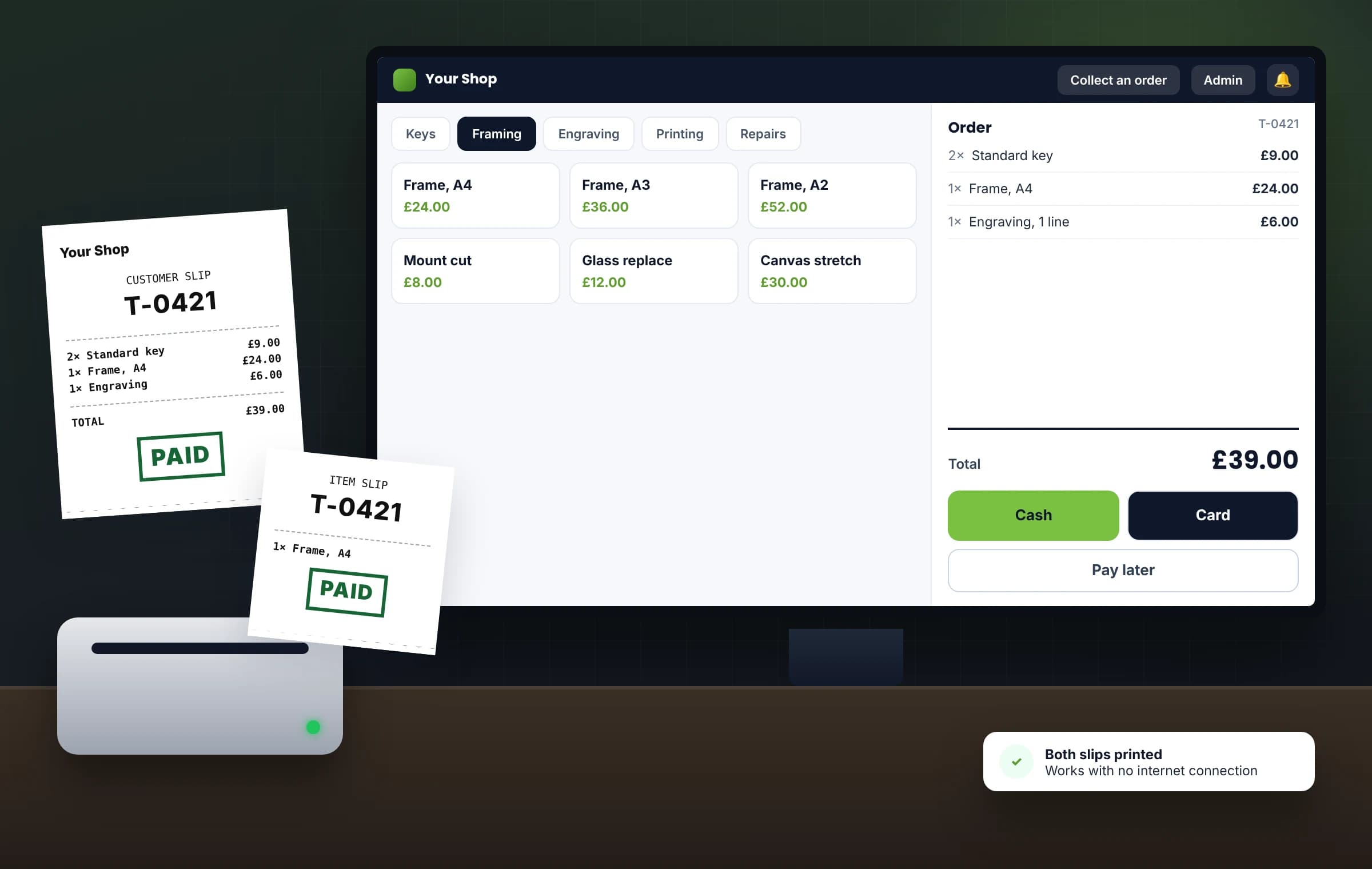
One platform, shaped around your business — not the other way round.
You're not buying rigid, off-the-shelf software. You get a proven system we tailor to how your trade actually works, then set it up and run it for you.
Sound familiar?
The day-to-day this replaces
Before → now
From paper tickets to one till
Before
A till that stops when the internet goes down.
Now
A till on your own PC that works without the internet.
Before
Handwritten tickets that go missing.
Now
Two printed slips with the same ticket number, cut between them.
Before
A ticket that doesn't say whether it's paid.
Now
PAID or UNPAID in large print on both slips, with "Pay on collection" when it's unpaid.
Before
Hunting for the item when the customer comes back.
Now
Find the order by its ticket number and hand it over.
Before
End-of-day sums by hand.
Now
A printed daily report with the takings, net cash and net card, and what is still unpaid.
Before
Anyone at the counter can give a refund.
Now
Refunds and cancels need the PIN, and every one is recorded.
A day with the system
One order, from the counter to collection
Owner
Opens up and switches on the PC. The till starts with the computer and opens full-screen, ready to take orders.
Counter
A customer brings an item in. Tap the service, set the quantity, change the price if it needs it, then take Cash or Card, or mark it Pay later.
Counter
Two slips print with the same ticket number, cut between them. The customer takes their slip; the item slip goes with the item. Both say PAID or UNPAID in large print.
Counter
The customer comes back with their slip. Find the order by its ticket number, take the payment if it says "Pay on collection", and hand the item back.
Owner
A customer needs a refund. The owner enters the PIN, gives the refund, and the till records it.
Owner
At closing, prints the daily report with the PIN: the takings, net cash and net card, what is unpaid from today and all unpaid orders from any day.
Owner
At the end of the week, looks at the weekly report, Monday to Sunday, on screen, and prints it with the PIN.
One order, from the counter to collection, with the day's sums on paper at closing.
Who uses it
One system, a view for each person
Counter staff
Take orders with a few taps, print both slips, find an order by its ticket number and hand it back. Payments at the counter, Cash or Card, now or on collection.
You, the owner
The PIN for Admin, refunds, cancels and every report print. The daily and weekly reports, every refund and cancel on record, and updates installed when you say.
Tailored
Built around your shop
Your business isn't standard. Your software shouldn't be either. We set it up around your shop: your services, prices, slips and reports, and we can add what you need. Need a field added, a step removed or a feature that doesn't exist yet? We change it or build it — before you go live, and as your business grows. We agree it with you first.
Your services, your prices and your slips, set up the way your counter works.
A look inside
One system, from first enquiry to final payment
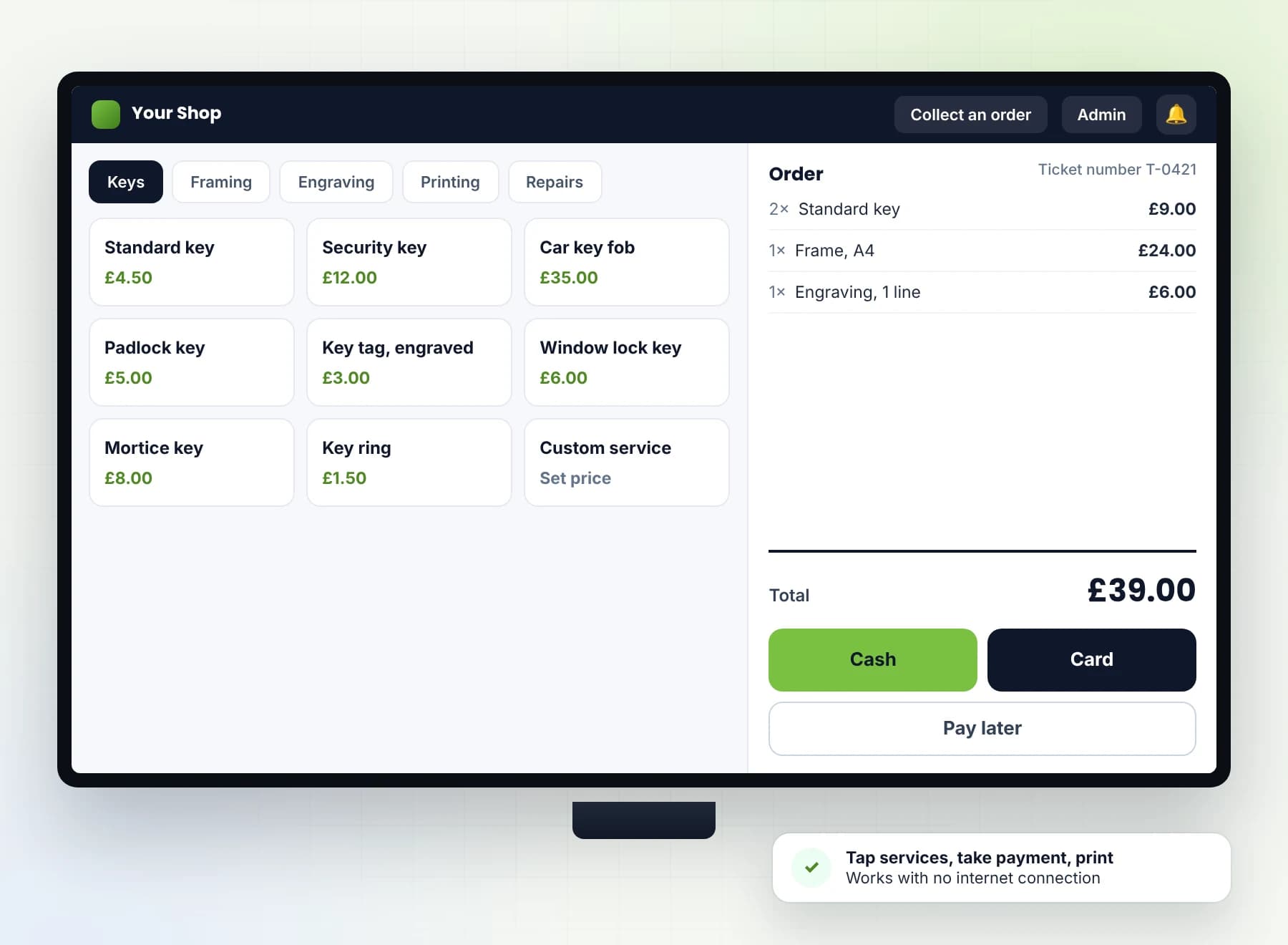
The till screen
Your services on buttons, grouped in tabs. Tap to add, set the quantity, change a price if you need to, then take Cash or Card, or mark it Pay later.
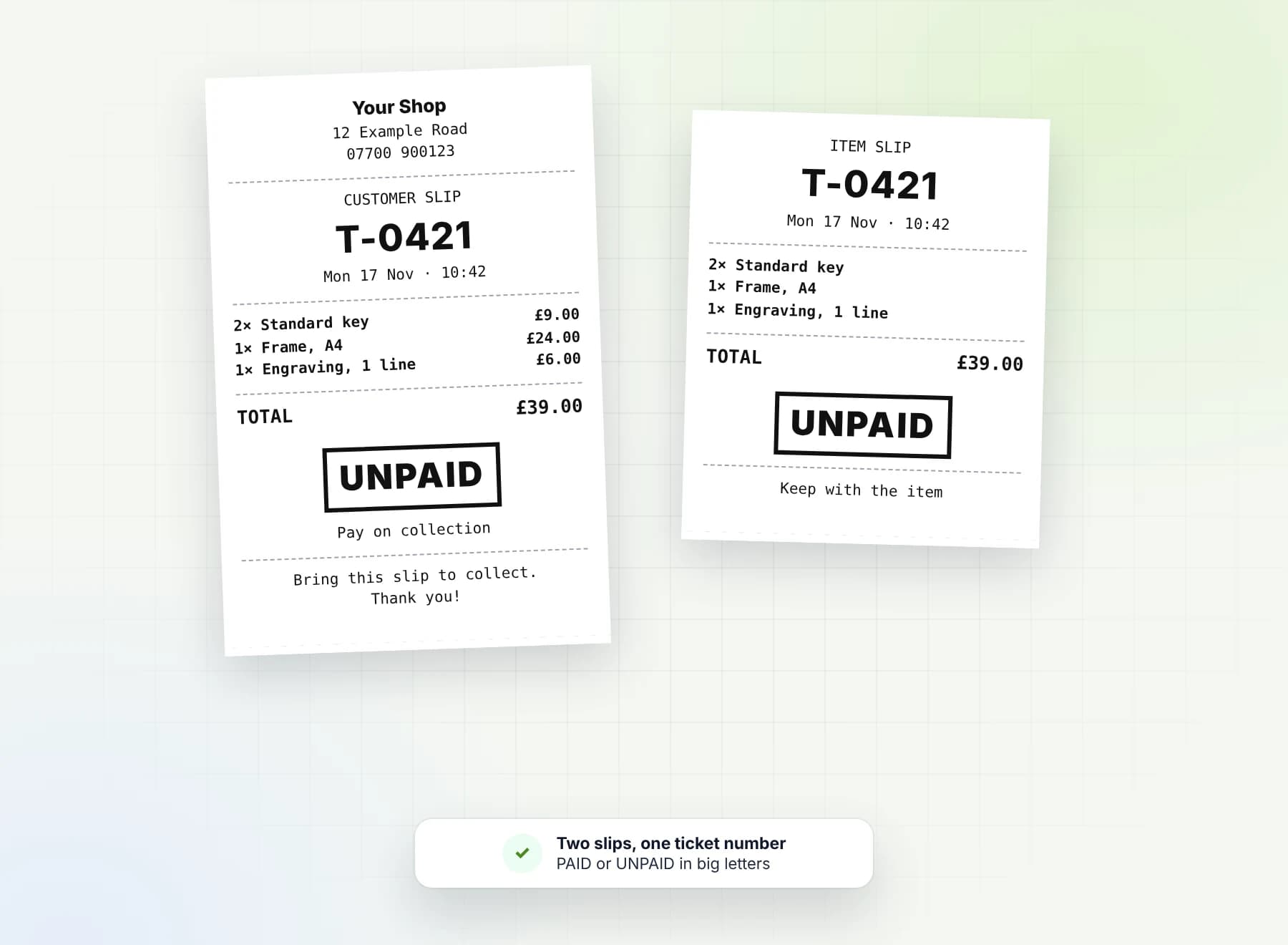
Two slips, one ticket number
A customer slip and an item slip print with the same ticket number, cut between them. PAID or UNPAID is as big as the ticket number, with "Pay on collection" when it's unpaid. Service lines are in bold, and your shop's details are on the customer slip.
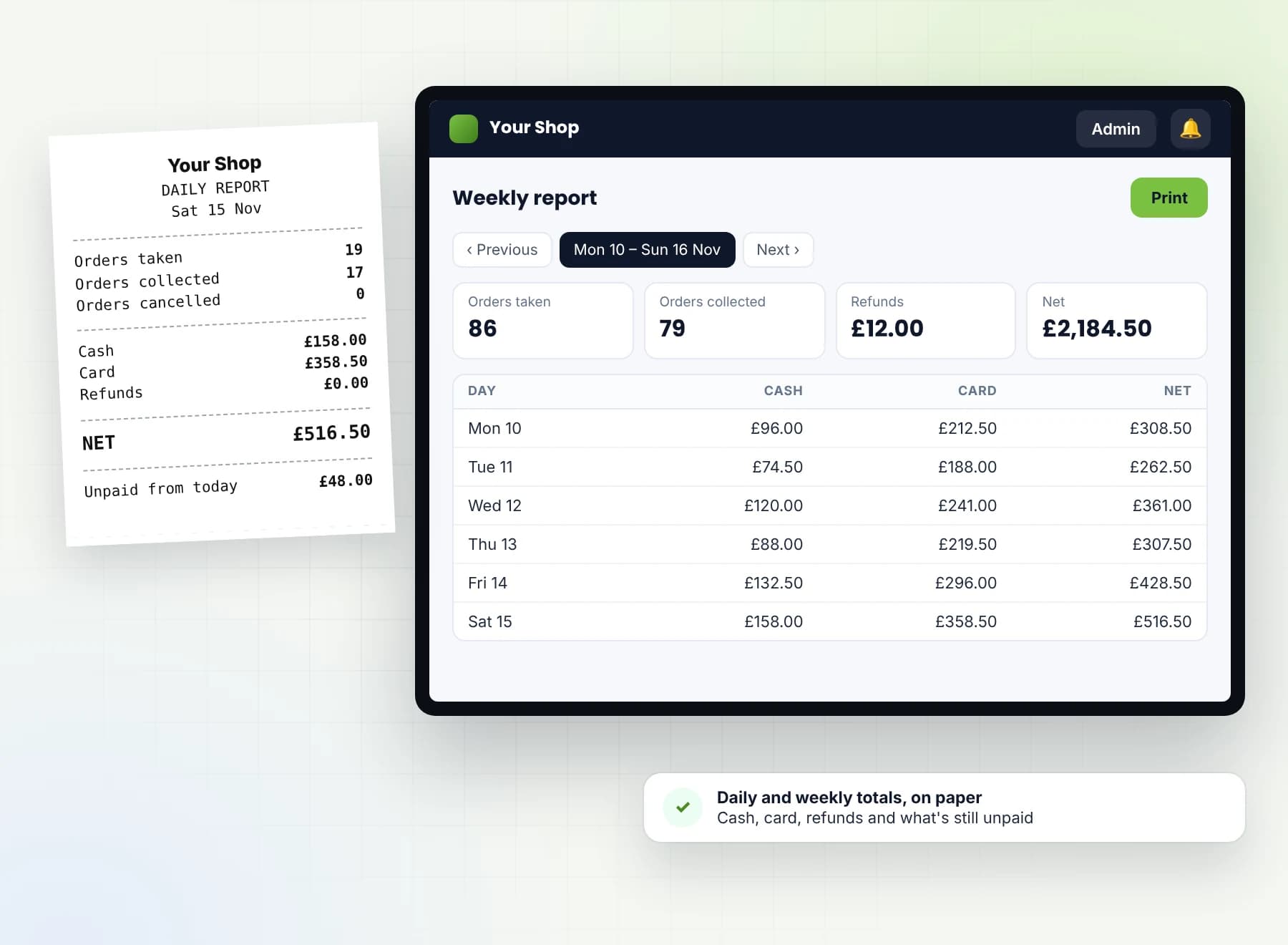
Daily and weekly reports
The daily report shows the takings, net cash and net card, what is unpaid from today and all unpaid orders. The weekly report covers Monday to Sunday, on screen and on paper. Every report print asks for the PIN.
Safe updates
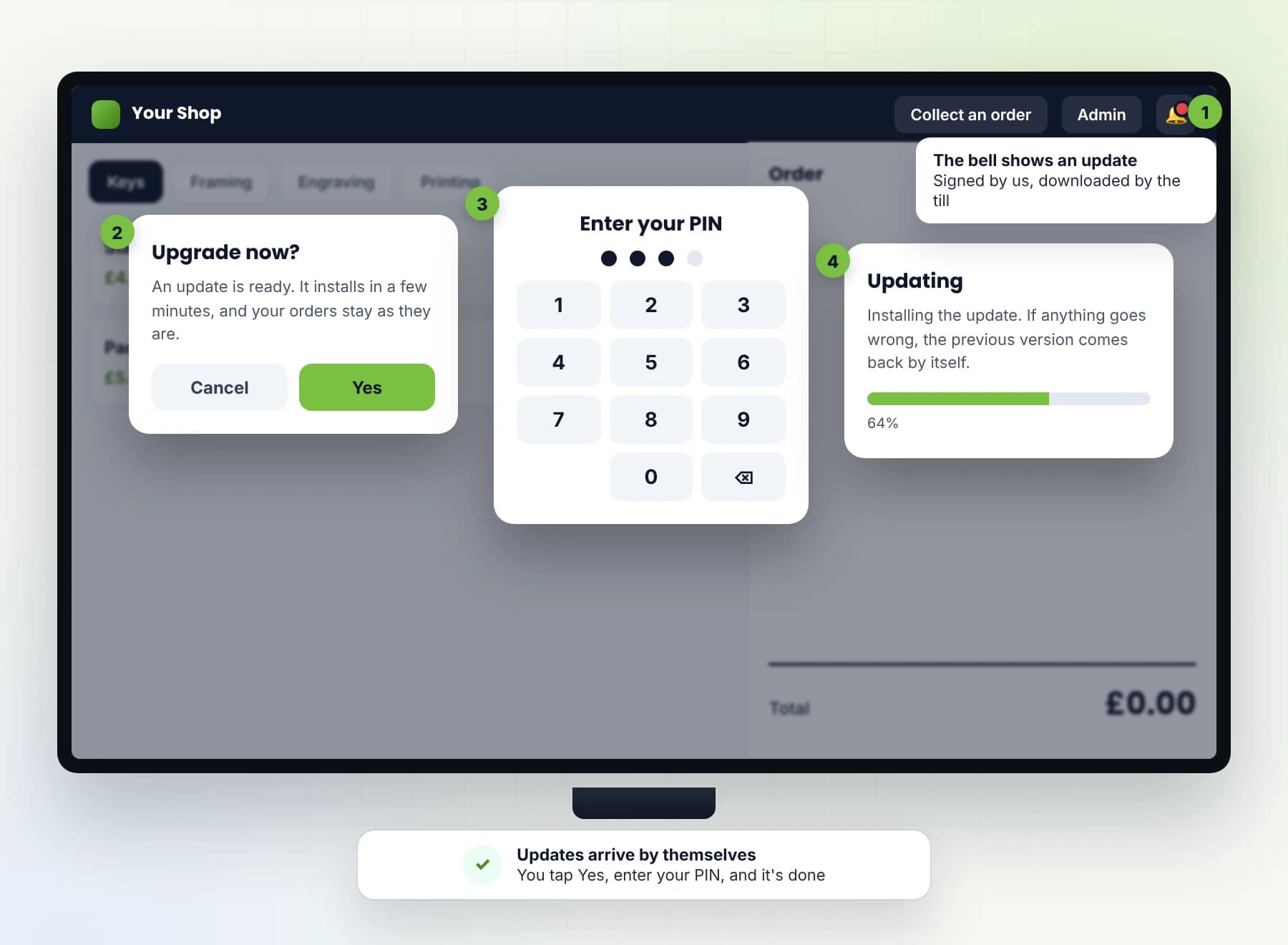
Updates come from us, signed, and the till downloads them itself. When one is ready, the bell shows it: tap Upgrade now, enter your PIN and watch the progress. If an update fails, the old version comes back.
How it works
A proven platform, tailored to you
We look at how your shop works
How an order comes in today, what goes on the ticket, how items go back to customers and how you add up the day.
We set it up around your shop
We set it up around your shop: your services, prices, slips and reports, and we can add what you need. The till itself is already built and in use.
We take it live
On your shop's Windows PC with a receipt printer. It starts with the computer and opens full-screen, ready for the counter.
Supported for you
Signed updates from us, installed when you say, with your PIN. Your sales records stay on your own PC, and we don't hold them or back them up. The till is set up, updated and supported for you.
Running live today
Proof, not a prototype
In use at a real shop since October 2026. Orders, both slips, collection by ticket number and the daily and weekly reports all run on the shop's own PC, with or without the internet.
What's included
Everything in one platform
Taking orders
- Your services on buttons, grouped in tabs
- Set the quantity and change a price on the order
- Pay now by Cash or Card, or Pay later
Slips
- A customer slip and an item slip with the same ticket number, cut between them
- PAID or UNPAID printed as big as the ticket number, on both slips
- "Pay on collection" under UNPAID
- Quantity and service name in bold
- Your shop's details on the customer slip
Collection
- Find an order by its ticket number
- A list of orders, with filters
- Take payment on collection, then hand the item back
- Refunds and cancels, each one recorded
Reports
- A printed daily report: takings, net cash and net card
- Unpaid from today, and all unpaid orders from any day
- A weekly report, Monday to Sunday, on screen and on paper
- The PIN at every report print
Security
- A 4-digit Admin PIN on Admin, refunds and cancels
- Wrong tries lock the PIN
- Admin locks itself when left idle
- The till runs full-screen on its own Windows account
- The data folder is locked to the system
Updates
- Signed updates from us
- The till downloads them itself
- You install with Upgrade now and your PIN, and see the progress
- If an update fails, the old version comes back
- A Check for updates button that only checks
Works without the internet
- Orders, slips, collection and reports all work offline
- The internet is only needed for updates and the optional Google Sheet
- The till only downloads; it sends nothing out unless you turn on the Google Sheet
Optional
- Can send payments and refunds to your own Google Sheet.
Built to last
The engineering behind it
Runs on your own PC. Nothing to sign in to online. Orders, slips, collection and reports all work without the internet.
Starts with the computer. The till opens full-screen on its own Windows account, which signs in by itself.
Safe updates. Signed updates from us; the till downloads them, you install them with your PIN, and if one fails the old version comes back.
Sends nothing out. The till only downloads updates. It sends nothing, unless you turn on the Google Sheet.
Your sales records stay on your own PC, and we don't hold them or back them up. The till is set up, updated and supported for you.
- Latest tech
- A full-screen till on your shop's Windows PC, kept up to date with signed updates from us.
- Speed
- Tap the services, take the payment, and both slips print. Collection is one ticket number away.
- Reliability
- Works without the internet, starts with the computer, and puts the old version back if an update fails.
- Security
- A 4-digit PIN on Admin, refunds, cancels and every report print, and the till on its own Windows account with its data folder locked.
- Performance
- One till doing the work of a ticket book, a cash tally and the sums at the end of the day.
Frequently Asked
Common questions, honest answers
Does the till work without the internet?
What hardware do I need?
Can I change my services and prices?
Can customers pay when they collect?
How do updates work?
Where is my data kept?
Can it send my sales to Google Sheets?
Can my staff give refunds?
Can you set it up for my shop?
How long does it take to set up?
Why Sunrise
Why order from Sunrise
In use, not a prototype. In use at a real shop since October 2026.
Built around your shop. Your services, prices, slips and reports, set up the way your counter works.
Your sales records stay on your own PC, and we don't hold them or back them up. The till is set up, updated and supported for you.
A timeline agreed before you start. No open-ended build.
Tell us how your shop takes orders today, and we'll tell you plainly if this fits.
The quickest way is a message — tell us how you work now and we'll tell you plainly whether this is a fit. No pressure, no jargon.
Prefer a form? Three fields, that's it.