
Your flooring customers, jobs and fitters, run from one system
Customers, jobs, the diary, measurements and invoices in one back office, with a mobile portal for your fitters — tailored to how your business works.
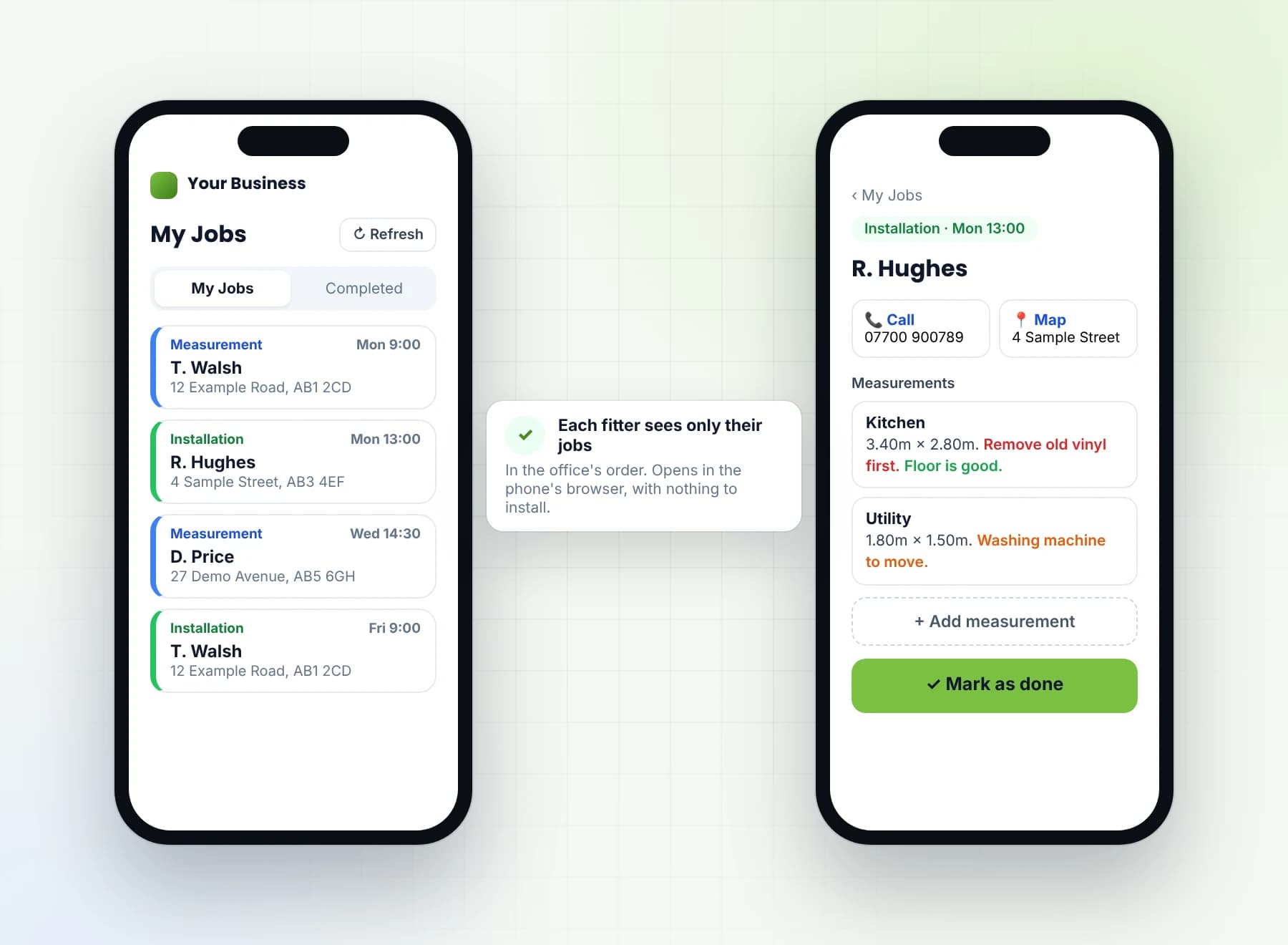
This is flooring business software: a back-office system for flooring retailers and fitting teams. It keeps customers and jobs, the diary, rooms and measurements, and invoices and payments in one place, with a mobile portal for your fitters. The office sees everything. Each fitter sees only their own jobs, with the customer's name, a phone number to tap and call, an address to tap and map, and the measurements. Invoices are built from line items and print or download as a PDF. The office system has run a real UK flooring business since May 2026, and the fitter portal has been live since May 2026.
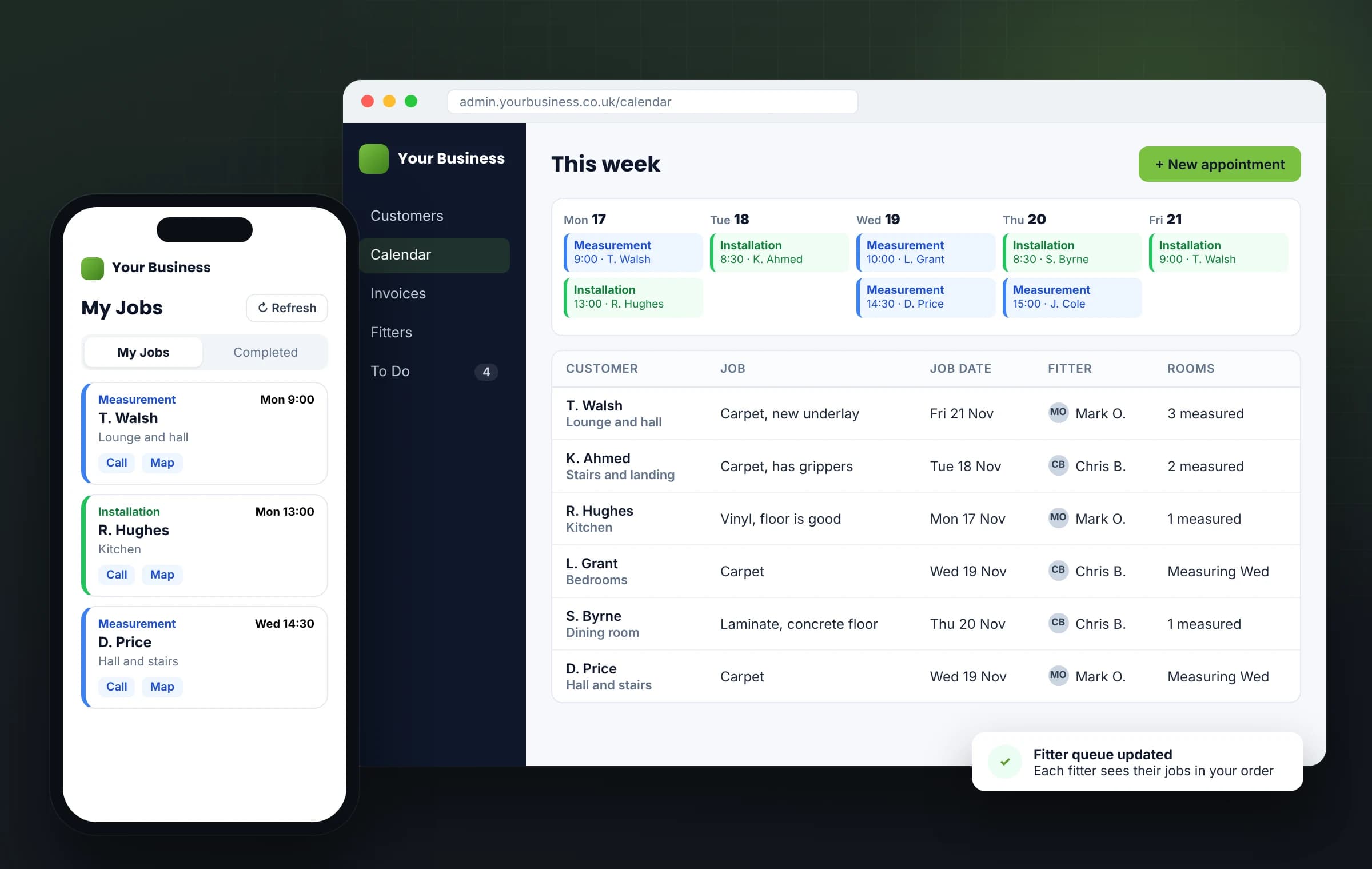
One platform, shaped around your business — not the other way round.
You're not buying rigid, off-the-shelf software. You get a proven system we tailor to how your trade actually works, then set it up and run it for you.
Sound familiar?
The day-to-day this replaces
Before → now
From scattered to one system
Before
Fitters ring the office to find out where they're going next.
Now
Each fitter opens the portal and sees their own jobs, in the order the office set.
Before
The diary, the customer list and the invoices in three places.
Now
Customers, jobs, Calendar appointments and invoices in one back office.
Before
Measurements written on paper, or passed on by phone.
Now
Rooms and measurements saved on the job; the fitter can add one from their phone.
Before
A note that matters gets missed on site.
Now
Notes on measurements in red, orange or green, which the fitter sees on their phone.
Before
Invoices typed up separately from the job.
Now
Invoices from line items, with payments and a status, printed or downloaded as a PDF.
Before
Customers to ring back, kept in someone's head.
Now
A To Do list of customers the office has flagged to follow up.
A day with the system
One job, from first call to paid invoice
Office
A customer rings about new flooring. The office adds them, with landlord details if the property is let, and books a Measurement appointment in the Calendar.
Office
Creates the job, adds the rooms, gives it to a fitter and drags it into the right place in their queue.
Fitter
Opens the portal on their phone. My Jobs loads in the order the office set; a tap on Refresh picks up the one just added.
Fitter
Taps the job for the customer's name, taps Call to ring them, and taps Map to open the address.
Fitter
On site, sees the notes on the measurements in red, orange or green, taps Add measurement, then Mark as done. The job moves to their Completed list.
Office
Opens the job and finds the measurements on it, then builds the invoice from line items and prints it or downloads the PDF.
Office
Records the payment, so the invoice's status changes, and flags a customer for the To Do list to ring back.
One job, from the first call to a paid invoice, with the fitter's part on their phone.
Who uses it
One system, a view for each person
The office
Customers, jobs, the Calendar, rooms and measurements, invoices and payments, and the fitters' queues, in one back office. Sees everything.
Your fitters
A mobile portal with their own jobs only, under My Jobs: the customer's name, a phone number to tap and call, an address to tap and map, and the measurements. They add measurements, mark jobs as done and see them under Completed.
You, the owner
Every customer, job, appointment and invoice in one place, with each invoice's status a glance away and the To Do list in front of you.
Tailored
Built around your business
Your business isn't standard. Your software shouldn't be either. We set the system up to how you work: your customer and landlord details, your rooms and measurements, your measurement notes, your fitters and how their jobs are ordered, your invoice items and your To Do list. Need a field added, a step removed or a feature that doesn't exist yet? We change it or build it — before you go live, and as your business grows. We agree it with you first.
Your customers, your diary and your fitters, set up the way you run them.
A look inside
One system, from first enquiry to final payment
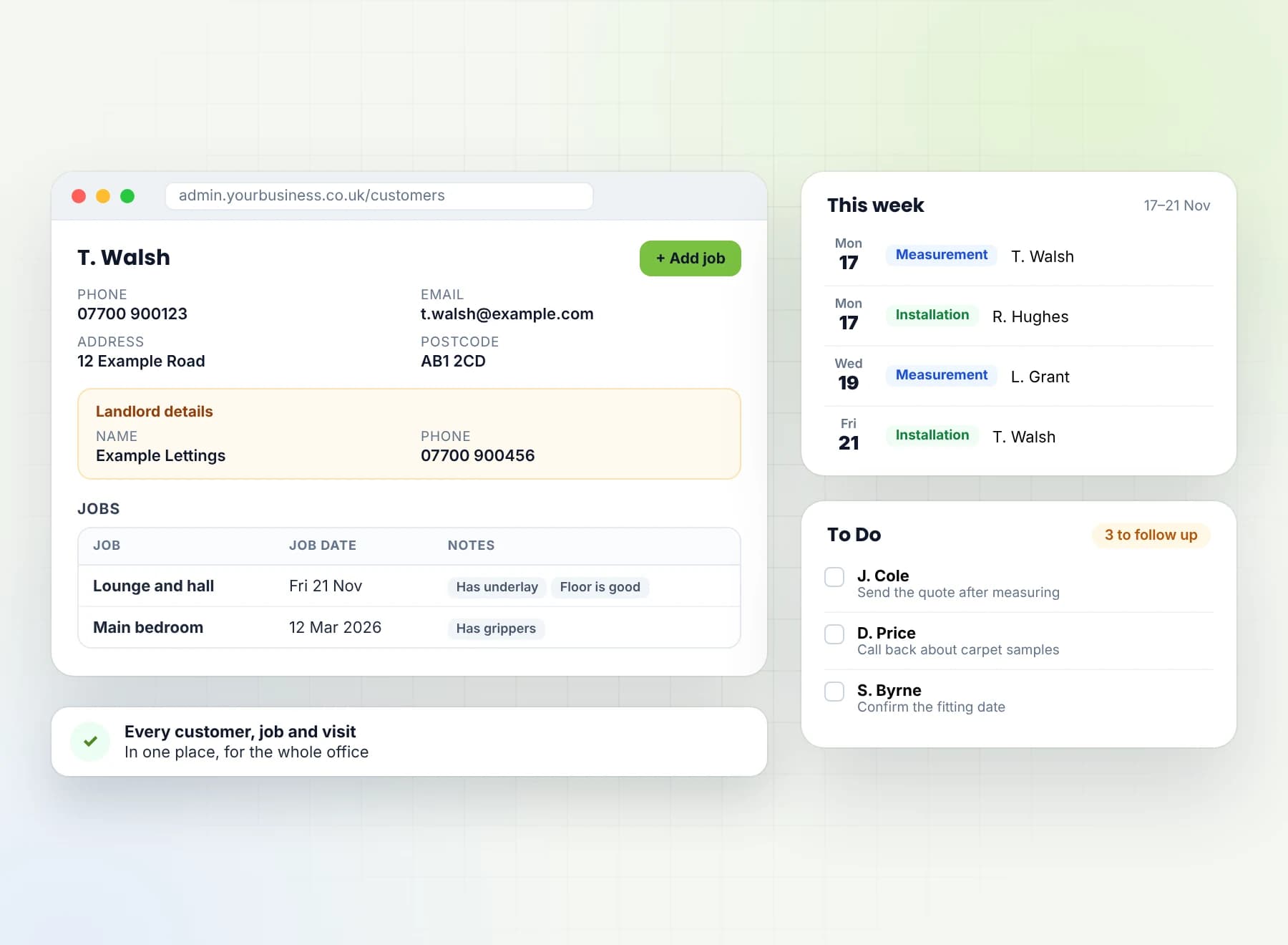
Customers, jobs and the Calendar
Every customer and job in one place, with appointments in the Calendar, each marked Measurement or Installation. Landlord details sit on the record, and the To Do list keeps the customers you need to follow up.
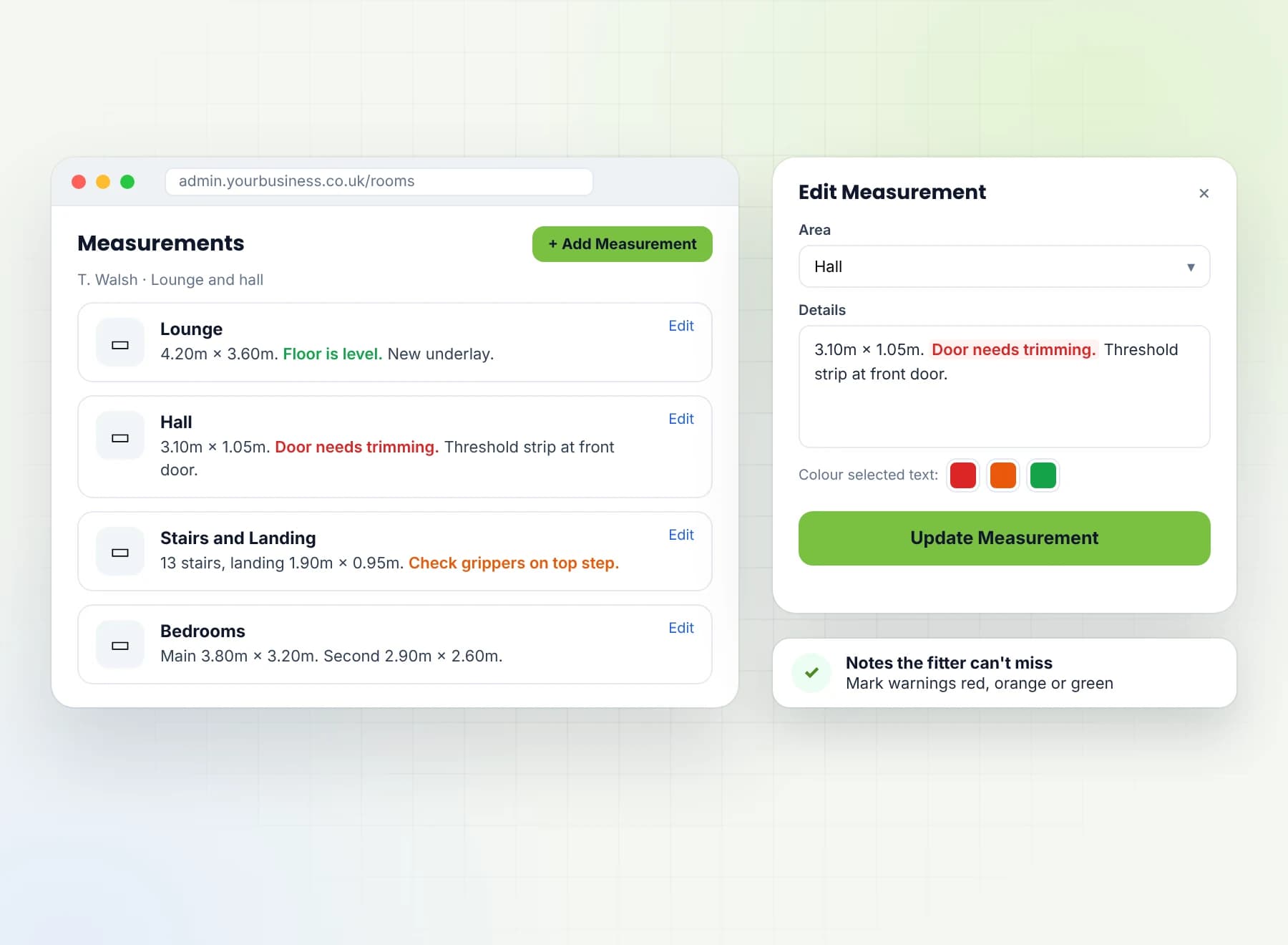
Rooms and measurements
Each job holds its rooms and their measurements. Mark a note on a measurement red, orange or green, and the fitter sees the colour on their phone.
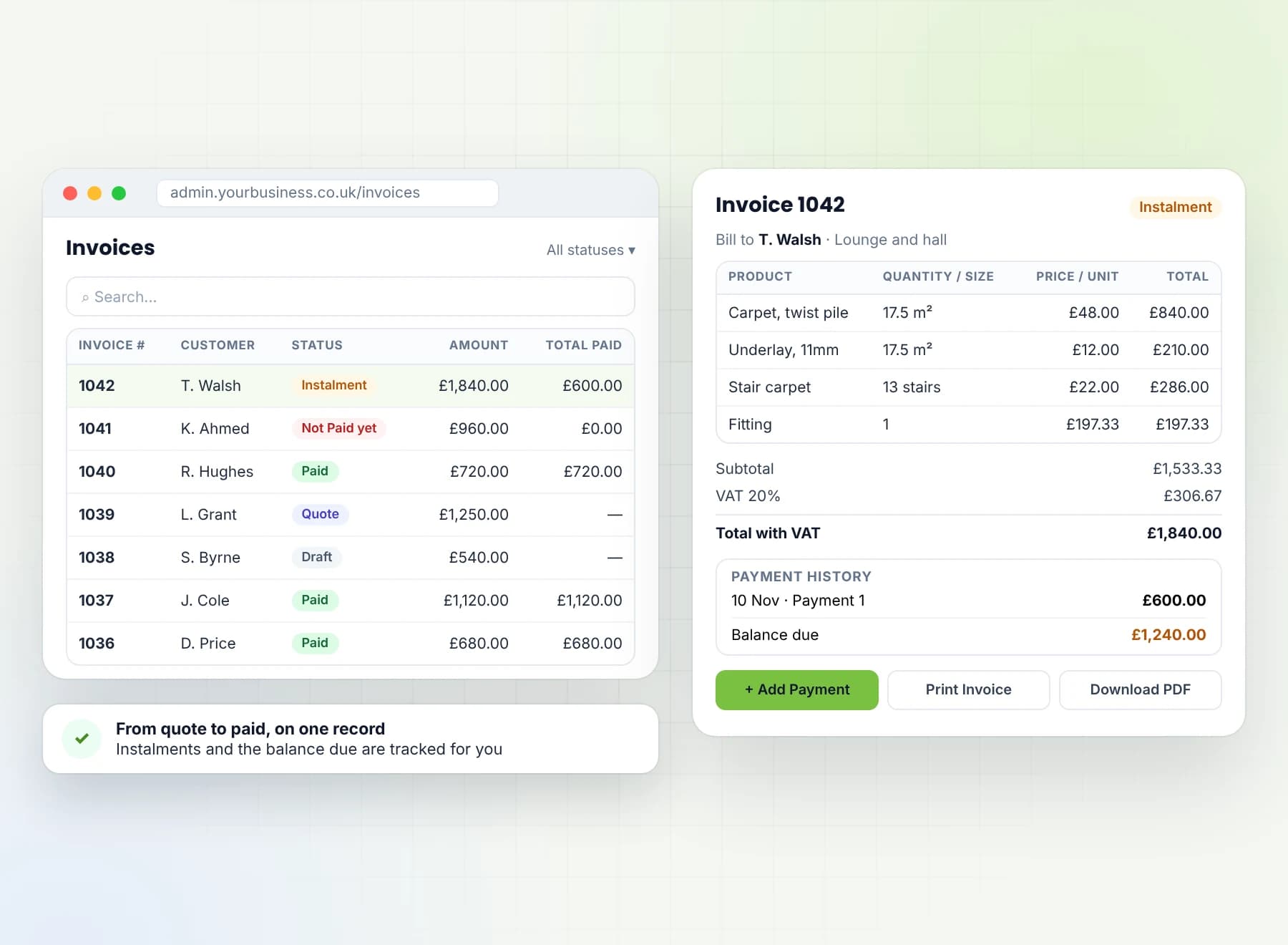
Invoices and payments
Invoices built from line items, with payments recorded and a status on each: Quote, Draft, Not Paid yet, Instalment or Paid. Search and sort the list, then print the invoice or download the PDF.
The fitter portal
Each fitter logs in on their phone and sees only their own jobs under My Jobs, in the order the office set. A tap calls the customer or opens the address in a map. They add a measurement, tap Mark as done, and find the job under Completed. The jobs load when they open the portal, and the Refresh button picks up any change.
How it works
A proven platform, tailored to you
We look at how you work
How a job moves today from the first call to the fitter and the invoice, and where the phone calls and paper pile up.
We set up your system
The system is already built and running. We set it up with your customers, your fitters, your rooms and measurement notes, and your invoice items.
We take it live
The office gets its logins, each fitter gets a login for the portal, and your customers and jobs are in from day one. UK-hosted.
Run for you
Your data and your customers are yours, and we export them for you whenever you ask. The system is set up and run for you.
Running live today
Proof, not a prototype
The office system has run a real UK flooring business since May 2026, and the fitter portal has been live since May 2026. Customers, jobs, the diary, measurements, invoices and the fitter portal run as one system, and the database decides what each person can see.
What's included
Everything in one platform
Customers and jobs
- Every customer in one place, with their jobs
- Landlord details on the record
- A To Do list of customers the office has flagged to follow up
Calendar
- Calendar appointments, marked Measurement or Installation
Rooms and measurements
- Rooms and measurements saved on each job
- Notes on measurements in three fixed colours: red, orange and green
- The fitter sees the colour on their phone; only the office sets it
Invoices and payments
- Invoices built from line items
- Payments recorded against each invoice
- A status on every invoice, shown as a badge in the list: Quote, Draft, Not Paid yet, Instalment or Paid
- Search, sort and page through your invoices, and select several at once
- Print an invoice, or generate and download the PDF
Fitters
- A roster of your fitters
- Give each job to a fitter and drag their jobs into the order you want
- A mobile portal for each fitter, with a login
- My Jobs: their own jobs only, in the order the office set
- The customer's name, a phone number to tap and call, and an address to tap and map
- The job's measurements, and Add measurement on site
- Mark as done, and a Completed list
- The jobs load when the portal is opened, and a Refresh button picks up any change
Access
- The office sees everything
- Each fitter sees only their own jobs, and never the customer list
- The customer's name, phone and address are copied onto the job, so the fitter has what they need without the list
- The rules are set in the database, not just on the screen
Built to last
- UK-hosted
- Every change is checked before it is saved
Built to last
The engineering behind it
UK-hosted. The database and the app both run on UK servers.
Access decided by the database. The office sees everything; each fitter sees only their own jobs. The rules sit in the database, not just on the screen.
The fitter gets what they need, and no more. The customer's name, phone and address are copied onto the job, so the fitter never needs the customer list.
Checked before it's saved. Every change goes through checks that validate and clean it before it is stored.
Your data and your customers are yours, and we export them for you whenever you ask. The system is set up and run for you.
- Latest tech
- A modern web app for the office, and a mobile portal for fitters with nothing to install.
- Speed
- A fitter's jobs load when they open the portal, and the Refresh button picks up any change.
- Reliability
- UK-hosted, with the database and the app on UK servers.
- Security
- The database decides who sees what: each fitter sees only their own jobs, never the customer list.
- Performance
- One system doing the work of a diary, a customer list, an invoice book and the phone calls in between.
Frequently Asked
Common questions, honest answers
What is the best software for a flooring business?
My fitters aren't techy — will they manage it?
Do my fitters see changes straight away?
Can my fitters see all my customers?
Does it replace my diary?
Can it do my invoices?
Whose data is it?
Is it hosted in the UK?
Can you change it to fit my business?
How long does it take to set up?
Why Sunrise
Why order from Sunrise
Live, not a prototype. The office system runs a real UK flooring business.
Built for how flooring works. Rooms, measurements, fitters' queues and invoices, on one job.
Your data and your customers are yours, and we export them for you whenever you ask. The system is set up and run for you.
A timeline agreed before you start. No open-ended build.
Related
Related solutions
Quote-to-Invoice Platform
A UK service business — WhatsApp, a paper diary and handwritten quotes replaced by one system, from quote to paid invoice.
Instant Quote & Booking
A calculator plugin, a pricing spreadsheet and quotes by hand, turned into one system: instant quote, booking, card payment and admin.
Related service: Software Development
Tell us how a job gets from your showroom to your fitters, and we'll tell you plainly if this fits.
The quickest way is a message — tell us how you work now and we'll tell you plainly whether this is a fit. No pressure, no jargon.
Prefer a form? Three fields, that's it (plus one optional question).